Payments
Flow diagram
The following image shows the positive payment flow:
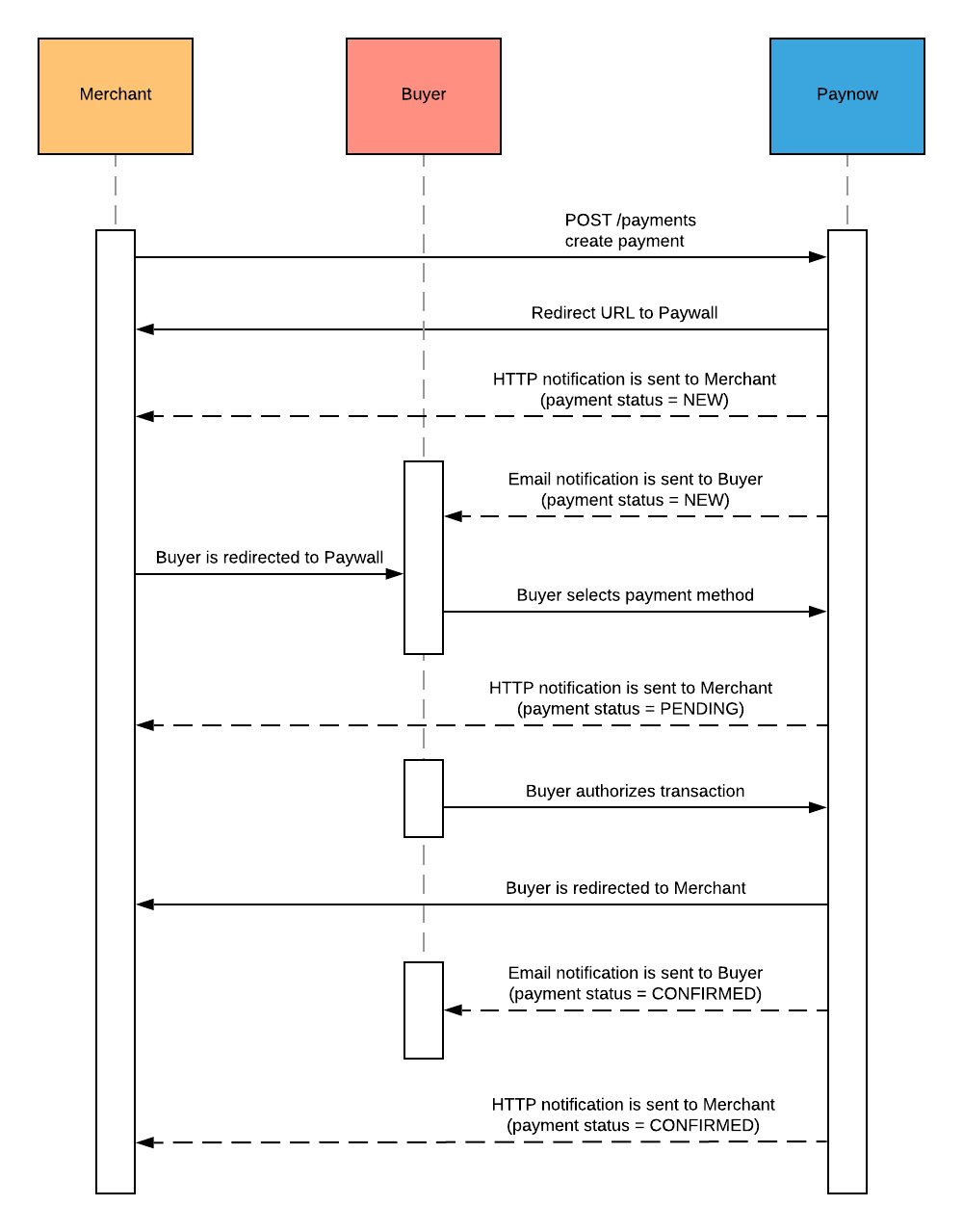
Flow of statuses
The following image depicts all statuses that a payment can take and possible transitions between them:
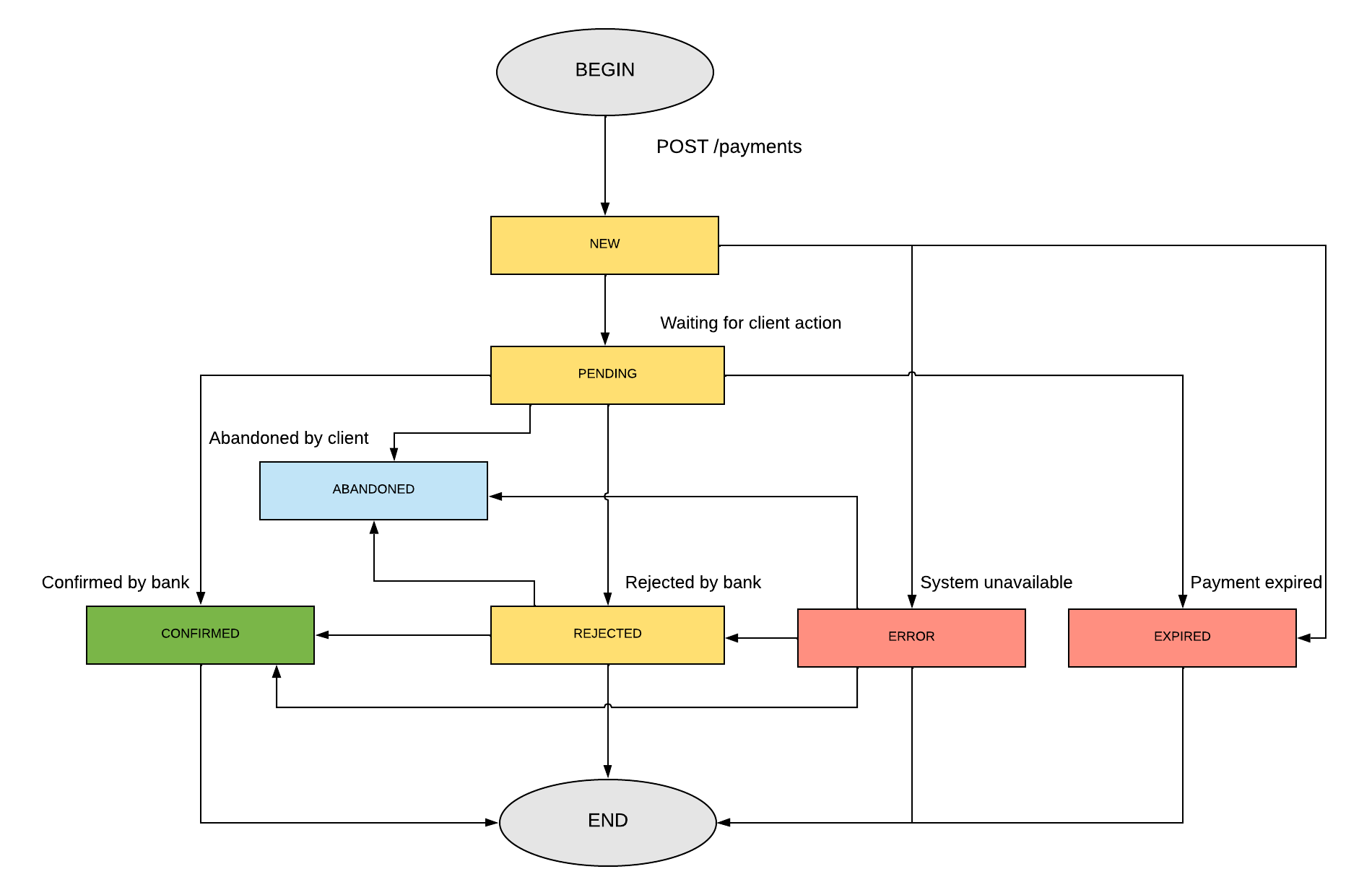
| Code | Description |
|---|---|
| NEW | Is only valid for payment without a selected payment method. This status means that the payment has been accepted by Paynow and Paynow is waiting for the user to select a payment method. |
| PENDING | Payment method has been selected and Paynow is waiting for the buyer to complete the payment. Once the payment method has been selected, the buyer cannot change it. |
| CONFIRMED | Payment has been successfully processed by Paynow and the money has been transferred to the recipient's account. |
| REJECTED | Payment was not authorized by the buyer. |
| ERROR | Problem occurred during the payment process. |
| EXPIRED | Validity time of payment has passed and the payment is no longer possible. |
| ABANDONED | Buyer retried to complete ERROR or REJECTED payment; new payment has new id and is connected to order. |
Any payment remaining in NEW or PENDING status for 10 days will be automatically re-processed to EXPIRED
status.
To use retry mechanism with ABANDONED, configuration option must be enabled in the Merchant Panel.
Make a payment
For purposes of this guide, we will assume that your keys are:
- Api-Key =
97a55694-5478-43b5-b406-fb49ebfdd2b5 - Signature-Key =
b305b996-bca5-4404-a0b7-2ccea3d2b64b
Step 1: Prepare a payment request message. Throughout this example, we'll use a simple message containing only required fields which look as follows:
{
  "amount": 45671,
  "externalId": "234567898654",
  "description": "Test transaction",
  "buyer": {
    "email": "jan.kowalski@melements.pl"
  }
}
The amount specified should be in the smallest unit of the payment currency (grosz in the case of PLN). It means that
the above request defines a payment for 456.71 PLN.
Each payment request must contain an 'externalId' that is assigned by the Merchant during creation. It uniquely
identifies the payment on the Merchant's side.
The description field can contain any text that helps to identify the payment.
The buyer field must include, at a minimum, the email address of the Buyer making the payment and may contain other
fields to describe the Buyer.
For a complete specification for the payment request
message, go to API reference.
In order to use certain payment methods (ex. PayPo) the Buyer field must also include the address field with billing and shipping fields containing at least the street, zipcode and city of the buyer as shown here.
Step 2: Attach Api-Key header with the value of Api-Key available in the Merchant Panel.
Step 3: Calculate signature and attach it as the Signature header.
For given
example correct signature is ZBlr1Eg2n28HHOkRkh1LyOD60xl0MQguYHDgJRy7Hps=
If you are trying to calculate the signature from the example in your code and are getting a different result, make sure that your JSON message is formatted the same way as the message in the example, i.e. with four-space indentation and no newline character at the end.
Step 4: Generate random string with maximum length of 45 characters for an Idempotency-Key header.
Step 5: Make a POST with prepared message on payment request endpoint
curl --request POST 'https://api.sandbox.paynow.pl/v3/payments' \
-H 'Content-Type: application/json' \
-H 'Api-Key: 97a55694-5478-43b5-b406-fb49ebfdd2b5' \
-H 'Signature: lGOrwYvoRYwWcKSEtE/YDn8go1w/i5dj8Rv/ytIvXVE=' \
-H 'Idempotency-Key: 59c6dd26-f905-487b-96c9-fd1d2bd76885' \
--data-raw '{
    "amount": 45671,
    "externalId": "234567898654",
    "description": "Test transaction",
    "buyer": {
        "email": "jan.kowalski@melements.pl"
    }
}'
Bear in mind, that the request must include Host and Accept headers as
described here. They are not listed above explicitly as the curl command
includes them by default.
Step 6: Handle the returned response:
{
  "redirectUrl": "https://paywall.sandbox.paynow.pl/NOLV-8F9-08K-WGD?token=eyJ0eXAiOiJKV1QiLCJhbGciOiJIUzI1NiJ9.eyJwb3NJZCI6IjEwMDAiLCJwYXltZW50SWQiOiJOT0xWLThGOS0wOEstV0dEIiwiZXhwIjoxNTU0ODEzMTY4fQ.71TLjI8U8p0c_hhC1Nj3cAPU3mtzYW4ylGo8qVeB18o",
  "paymentId": "NOLV-8F9-08K-WGD",
  "status": "NEW"
}
The response contains the URL that the Buyer should be redirected to, ID of the payment generated by Paynow, and the
current status of the payment.
Returned paymentId should be saved by Merchant for further reference.
Step 7: Redirect the Buyer to the address specified in the response. The Buyer will be redirected to Paynow paywall,
which guides her/him through the payment process. After finishing the payment, the Buyer will be redirected to a URL
provided by the Merchant during the configuration as return-url.
The return-url will contain additional URL parameters: paymentId and paymentStatus. To see more details, please
refer to the Flow Diagram
Step 8: During the payment process, Paynow delivers notifications about the current payment status each time the status is changed.
In case of failed payment, a similar message will be delivered containing REJECTED or ERROR status
instead depending on the reason for failure.
Payment recovery
Paynow offers payments recovery feature for payments on PENDING, REJECTED or ERROR status. Recovery is available
for all integrations. To support payment recovery you have to implement ABANDONED
from flow of statuses. All payments are connected by externalId from initial
payment.
How it works:
- Submit Create a payment request.
- Reject the payment.
- From status page use
Retry the paymentoption. Paynow will create payment with newpaymentId. - Complete the payment with authorization.
- Check the payment status or
accept notification with new
paymentId. TheexternalIdwill be the same like for first initial payment.
Payment validity time
The optional validityTime field in the create a payment request defines the
transaction execution timeout in seconds. Once this period elapses, an unfinished payment transitions to the EXPIRED
status.
If validityTime is omitted, the default value is applied. The minimum value is 60 seconds, while the default and
maximum values depend on the selected payment method (paymentMethodId):
Payment method (paymentMethodId) | Minimum value | Maximum and default value |
|---|---|---|
Standard payment (other methods or paymentMethodId omitted) | 60 s (1 min) | 864000 s (10 days) |
Saved cards and subscriptions (2202) | 60 s (1 min) | 7200 s (2 hours) |
Providing a value outside the allowed range for the selected payment method results in a 400 Bad Request
(VALIDATION_ERROR) response.
Expiring payments
If a payment should no longer be completed (for example, because the order was cancelled), you can expire it before its
validity period ends. The payment status changes to EXPIRED, and the Buyer can no longer complete the payment. For
more details, see the API reference.
Payments in NEW, PENDING, REJECTED or ERROR status can be expired. Payments in CONFIRMED or ABANDONED
status cannot be expired. A payment that already has the EXPIRED status remains unchanged.
After a payment is expired:
- Paynow sends a notification with the
EXPIREDstatus. - If the Buyer opens the payment link, they are redirected to the payment status page instead of the payment page.
Payments created through payment recovery
If the Buyer used payment recovery, there may be several payments for one order. The
expireRecoveredPayments flag determines which payments are expired:
expireRecoveredPayments | Effect |
|---|---|
false | Only the payment with the specified paymentId is expired. |
true | The specified payment will be expired, or the latest payment created through recovery for the specified paymentId, if it has NEW, PENDING, REJECTED or ERROR status. |
Request
For this guide, assume the Api-Key is 97a55694-5478-43b5-b406-fb49ebfdd2b5 and the paymentId is
NOLV-8F9-08K-WGD.
Step 1: Prepare the expiration request. The expireRecoveredPayments field is required:
{
  "expireRecoveredPayments": false
}
Step 2: Include the Api-Key header, calculate the signature and
include it in the Signature header, then generate
an Idempotency-Key.
Step 3: Send a PATCH request with the prepared message:
curl --request PATCH 'https://api.sandbox.paynow.pl/v3/payments/NOLV-8F9-08K-WGD/expire' \
-H 'Content-Type: application/json' \
-H 'Api-Key: 97a55694-5478-43b5-b406-fb49ebfdd2b5' \
-H 'Signature: NK6TMwZIA7CE1ncGVwvC5PB61mhMcMIE2WqwtawGCgk=' \
-H 'Idempotency-Key: 59c6dd26-f905-487b-96c9-fd1d2bd76885' \
--data-raw '{
    "expireRecoveredPayments": false
}'
Step 4: Handle the response:
You can check the payment status at any time using the payment status endpoint, or wait for a notification.
Order items (orderItems)
The optional orderItems array in the create a payment (POST /v3/payments)
request lets you pass the list of items included in the order.
OrderItem fields
| Field | Type | Constraints / allowed values | Requirement |
|---|---|---|---|
name | string | non-blank, max. 120 characters | Required (for every item when orderItems is non-empty) |
category | string | non-blank, max. 1000 characters | Required (for every item when orderItems is non-empty) |
quantity | integer (int64) | >= 1 | Required (for every item when orderItems is non-empty) |
price | integer (int64) | >= 0; single item price in the smallest currency unit (e.g. grosz for PLN; defaults to 0) | Optional |
producer | string | max. 120 characters | Optional |
type | string (enum) | BUNDLE, DIGITAL, DIGITAL_SERVICE, DONATION, GIFT_CARD, PHYSICAL, SERVICE | Required for paymentMethodId: 2202 (when orderItems is non-empty); optional otherwise |
frequency | string (enum) | ANNUAL, MONTHLY, QUARTERLY, WEEKLY | Required for paymentMethodId: 2202 (when orderItems is non-empty); optional otherwise |
Validation rules
Validation of the orderItems array depends on whether it is provided and on the selected paymentMethodId:
- Omitted or empty array (
null/[]) – theorderItemsfield itself is optional for all payment methods (including2202); when omitted or empty, item validation is not executed. - Base item rules (always enforced when
orderItemsis non-empty – for every payment method, including2202):- no element in
orderItemsmay benull, - each item must include
name(non-blank, max.120characters),category(non-blank, max.1000characters), andquantity(>= 1), - if
produceris provided, it cannot exceed120characters.
- no element in
- Additional rules for recurring card payments (
paymentMethodId: 2202, CIT and MIT):- when
orderItemsis non-empty andpaymentMethodId == 2202, in addition to the base rules above, every item must also includetypeandfrequency(cannot benull), - for all other payment methods (or when
paymentMethodIdis omitted),typeandfrequencyare optional – you may pass both, either one, or omit both.
- when
- Data types and enum values (always enforced, regardless of
paymentMethodId):- if
typeorfrequencyis provided, its value must match one of the allowed enum constants in uppercase (case-sensitive; numeric values and unknown strings are rejected), quantityandpricemust be non-negativeint64integers.
- if
Violating any of these rules returns 400 Bad Request with errorType: "VALIDATION_ERROR" (e.g. orderItems[0].name: name cannot be blank, orderItems[0].type: type cannot be null, or type: invalid field value (...)).
"orderItems": [
  {
    "name": "Monthly subscription - PRO plan",
    "producer": "Your Company",
    "category": "Subscription",
    "quantity": 1,
    "price": 4900,
    "type": "DIGITAL_SERVICE",
    "frequency": "MONTHLY"
  }
]